

Documentation Index
Fetch the complete documentation index at: https://ampersand-24eb5c1a-dipu-procore.mintlify.app/llms.txt
Use this file to discover all available pages before exploring further.
What’s Supported
Supported Actions
This connector supports:- Read Actions, including full historic backfill. Please note that incremental read is not supported for all objects.
- Write Actions.
- Subscribe Actions.
- Proxy Actions, using the base URL
https://api.housecallpro.com.
Supported Objects
The Housecall Pro connector supports the following objects.- customers (read, subscribe, write; incremental read supported)
- employees (read, subscribe)
In Housecall Pro’s webhook UI, this event appears as pro.created, but the actual payload uses employee.created.
- estimates (read, subscribe, write; incremental read supported)
- events (read; incremental read supported)
- jobs (read, subscribe, write; incremental read supported)
- job_fields/job_types (read, write)
- leads (read, subscribe, write)
Delete events for lead are not reliable due to HouseCall Pro’s platform limitations.
- lead_sources (read, write)
- price_book/materials (write)
- price_book/material_categories (read, write; incremental read supported)
- price_book/price_forms (read, write)
- price_book/services (read)
- service_zones (read)
- routes (read)
- tags (read, write)
- invoices (read, subscribe)
- job.appointments (subscribe only via
otherEvents)-
Example
subscribefragment (forjob.appointmentsonly):List Housecall Pro’s event strings exactly as they appear in webhooks. Standard events are not supported for this object. See Other events.
-
Example
Example integration
For an example manifest file of a Housecall Pro integration, visit our samples repo on GitHub.Before you get started
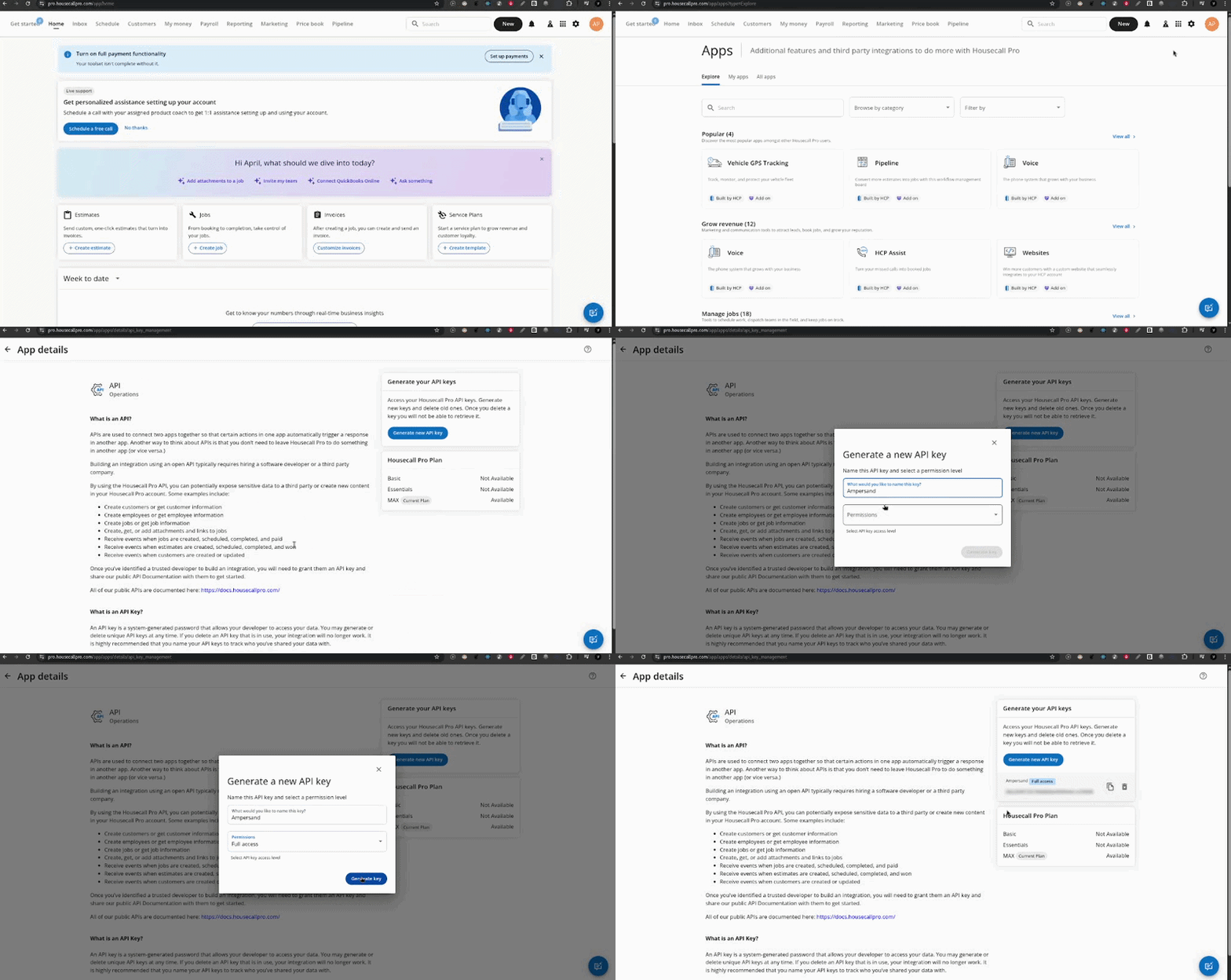
To use the Housecall Pro connector, you’ll need an API Key from your Housecall Pro account. Here’s how to get it:- Sign into your Housecall Pro account and go to App Store.
- Find the API Key Management under My Apps, and click on it.
- On the right-hand side, click Generate API Key.
- Name your API Key.
- Copy the API Key.
Using the connector
This connector uses API Key authentication, which means that you do not need to set up a Provider App before getting started. (Provider apps are only required for providers that use OAuth2 Authorization Code grant type.) To integrate with Housecall Pro:- Create a manifest file like the example.
- Deploy it using the amp CLI.
- If you are using Read Actions or Subscribe Actions, create a destination.
- Embed the InstallIntegration UI component. The UI component will prompt the customer for an API key.
- Start using the connector!
- If your integration has Read Actions or Subscribe Actions, you’ll start getting webhook messages.
- If your integration has Write Actions, you can start making API calls to our Write API.
- If your integration has Proxy Actions, you can start making Proxy API calls.